
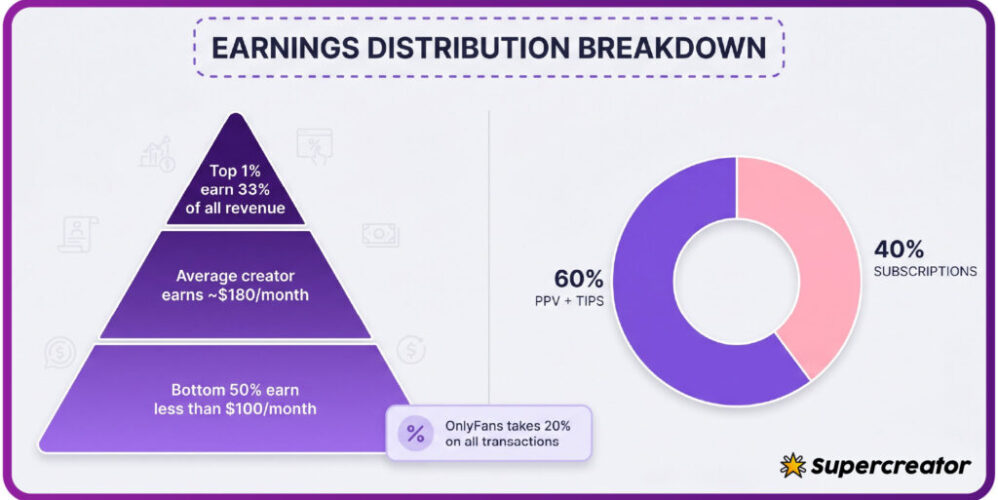
Free OnlyFans pages look like the cheapest way to follow a creator, because the subscription price is set to $0. The cost does not disappear at that point. It moves into pay-per-view messages, tips, and small one-off unlocks that are easy to approve in the moment and easy to forget by the end of the month. A monthly audit is the simplest way to find those leaks.

This article sets out a repeatable audit you can run in under an hour. It covers where free pages leak money, how to read a card statement, a short weekly check, a monthly reconciliation, and how to set a cap for the next month. The method does not require spreadsheets you will abandon after two weeks. It requires one list, one statement, and one decision per page.
The scale of the platform matters here. Growth in 2020 pushed a large number of new accounts onto a system that has no built-in discovery feed or directory. That gap is the reason ranking sites such as BestOnlyFans exist at all. It also means every page you follow arrived through a link, a mention, or a search result you found yourself, which makes it harder to remember what you subscribed to.
Where free pages leak money
A free page earns through three charge types, and all three appear on your statement with different labels. The amounts are usually small on their own. The problem is repetition, not size. Three or four unlocks a week at a few dollars each adds up faster than a single paid subscription at the $4.99 minimum.
- Pay-per-view messages: typically $3 to $20 per unlock, sent as a direct message with a locked attachment
- Tips: commonly $5 to $25, sometimes sent to unlock a request or to move a conversation forward
- Bundles or one-off offers: usually $10 to $30, sold as limited posts or grouped content
Paid pages behave differently. The subscription range runs from $4.99 at the minimum to $49.99 at the maximum, with most paid pages sitting between $4.99 and $15. The average lands around $5 to $10. There is no base price below $4.99, and only promotional first months may dip under that figure. A free page has no price at all, which removes the one number that normally anchors a monthly budget.
The platform fee is 20% on everything: subscriptions, tips, and pay-per-view unlocks. The creator keeps 80%. That split does not change your total, but it explains why creators push pay-per-view and tips so consistently. Your audit has to account for all three charge types, not just the ones you remember approving.

Reading your card statement line by line
Start with the statement, not with the app. The app shows what you engaged with; the statement shows what actually left your account. Match each line to a page by date and amount, then mark anything you cannot identify within 60 seconds. Unidentified lines are the first target of the audit.
| Statement label | What it usually means |
|---|---|
| OF or ONLYFANS plus a short code | A pay-per-view unlock or tip sent through a direct message |
| Recurring charge on the same date each month | A paid subscription on auto-renew, not a free page |
| Two charges of the same amount, same day | Likely two separate unlocks on one page, or a duplicate tap |
| Small charge under $5 | Usually a tip, sometimes a promotional price on a paid page |
| Charge after a price rise | Auto-renew was stopped; this is the final payment of the current period |
One rule matters more than the rest: when a creator raises the subscription price, auto-renew stops automatically. Existing access lasts until the current paid period ends, and no further charge appears unless you renew. If you see a payment after a price change, it is the last one of that cycle rather than a new rate.
Warning: a $0 subscription can sit alongside $40 of pay-per-view in the same month. If you only track the subscription line, you will read that month as free when it was not.
Keep the statement pass short. You are not building a finance system. You are answering one question per line: was this planned or not. Anything unplanned goes on the audit list and stays there until the monthly review.

The five-minute weekly check
A weekly check stops drift before it becomes a monthly surprise. Five minutes is enough if you follow the same order every time. Do it on the same day each week so it becomes automatic rather than a decision.
- Open your payment history and sort by this week only.
- Flag every pay-per-view unlock and tip, however small.
- Write the page name next to each flagged charge.
- Add the week’s total to a running figure on one note.
- Pause any page that produced charges you cannot explain.
Pausing is not cancellation. It is a temporary stop that keeps the decision for the monthly review, when you have the full picture. Most people who abandon a budget do so because they make permanent decisions on incomplete data.
Ranking sites such as BestOnlyFans can help you compare pages, but they cannot see your statement. The weekly check is the only step that connects a page to your actual spending. Skip it and the monthly audit turns into guesswork. For a starting point, onlyfans free account collects free pages.

Monthly total versus monthly plan
At month end, put the intended figure next to the actual figure. If you never wrote an intended figure, use last month’s total as the baseline. The gap between the two numbers is the leak, and its size tells you how much attention the next month needs.
| Signal | Healthy example | Problem example |
|---|---|---|
| Number of pages charged | Three pages, all identified | Eleven pages, four unidentified |
| Largest single charge | $15 unlock, planned | $30 bundle, not planned |
| Unplanned share of total | Under a fifth of the month | More than half the month |
| Repeated small charges | Two tips, both remembered | Nine tips under $10, none remembered |
| Paid versus free mix | One paid page, two free pages | No paid pages, all spending on free pages |
Reconciliation is simple subtraction. Take the monthly total, remove every charge you can trace to a page you still want to follow, and the remainder is the leak. That remainder is the number you act on, not the total. The total includes spending you have already decided was worth it.

Deciding what to cut
Rank pages by cost per minute of use rather than by how much you like them. A page that costs $40 a month and holds your attention for two hours is cheaper per minute than one that costs $10 and gets opened twice for a few seconds. The ratio makes the decision easier to defend.
Before you cut, know what a normal month costs at each tier. The figures below come from the platform’s own pricing structure, not from estimates.
- Free page with no unlocks: $0 in subscriptions, spending only through pay-per-view and tips
- Free page with regular unlocks: $0 in subscriptions, $10 to $40 in pay-per-view and tips
- One paid page at the minimum: $4.99 per month, no pay-per-view required
- One paid page at the typical range: $4.99 to $15 per month
- One paid page at the maximum: $49.99 per month
Cut from the bottom of the ranking first. If two pages sit at the same cost per minute, keep the one you opened most recently and remove the other. BestOnlyFans and similar directories can help you find replacements when a page you valued stops posting, but replacements should not enter the list until the next month’s cap allows them.

Setting the next month’s cap
A cap is a number you write down before the month starts, not a feeling you check later. Base it on the healthy remainder from the reconciliation, then round down. Rounding up recreates the drift you just measured.
- Set the cap at the total minus the leak, rounded down to the nearest whole dollar.
- Divide the cap into a subscription allowance and an unlock allowance.
- Set the unlock allowance lower than last month’s unplanned figure.
- Leave a small buffer for one unplanned unlock, and no more.
- Review the cap at each weekly check instead of waiting for month end.
If the cap is breached in week one, the response is to pause pages rather than to raise the cap. Raising a cap mid-month removes the only mechanism that catches drift early. Revisit the number at the next reconciliation, when you have a full month of evidence.
Security settings belong in the same review. Turn on two-step authentication and check active sessions while you are in the settings screen. An unlocked account can generate pay-per-view charges you never approved, and those charges will look exactly like normal spending on the statement.
When a leak becomes a problem
A leak becomes a problem when it survives two consecutive audits at the same size. At that point the issue is not the pages, it is the process. The following mistakes keep leaks alive, and each one is avoidable.
- Tracking subscriptions only and ignoring pay-per-view and tips
- Auditing once and assuming the habit will hold without a weekly check
- Keeping pages that produced no charges you can identify
- Raising the cap mid-month instead of pausing pages
- Treating a promotional first month below $4.99 as the normal rate
None of these require a dramatic change. They require the same three steps repeated: read the statement, run the weekly check, reconcile at month end. The audit works because it is small enough to repeat, not because it is thorough.
FAQ
Can a free OnlyFans page still cost money?
Yes. A free page sets the subscription price to $0 and earns through pay-per-view messages and tips, so charges appear without a recurring subscription.
What is the lowest paid subscription price?
The minimum is $4.99. There is no base price below that figure, though promotional first months may dip under it.
What happens when a creator raises the price?
Auto-renew stops, and existing access lasts until the current paid period ends. No further charge appears unless you renew.
How much does the platform take?
The platform fee is 20% on subscriptions, tips, and pay-per-view. The creator keeps 80%.