
Scam messages on OnlyFans usually follow a small number of repeatable scripts, and recognizing those scripts is the fastest way to avoid losing money or access to an account. The platform hosts paid subscriptions and free pages, and because payments and messages run through the same inbox, a convincing fake can look like ordinary account mail. This article explains the common phishing patterns, how to inspect a sender and a link, why off-platform payment requests are a warning sign, and what to do after a suspicious message arrives.

One detail shapes the whole problem: OnlyFans has no built-in discovery feed or directory. Users find pages through links, social posts, and ranking sites, so unfamiliar messages arrive with little context. Ranking services such as BestOnlyFans compare public profile prices, promotions, activity and media counts, which helps users judge a page before subscribing. That same public information also helps a scammer imitate a page or a support notice.
Typical phishing scripts
Most phishing direct messages copy the tone of routine account notices. They create mild urgency, name a problem the reader did not report, and ask for a click or a reply. Because the scripts repeat, a reader who sees the same pattern twice can usually identify it the second time.
- Fake support: a message claims to be from the support team and says the account needs verification, a password reset, or a policy review.
- Fake refund: a message says a subscription was charged in error and offers a refund link that actually collects card details.
- Fake locked-content alert: a message claims purchased media is locked or a subscription failed, then links to a page asking for a login.
- Fake creator offer: a message poses as a creator offering a cheaper subscription through an external checkout page.
- Fake security warning: a message says someone else tried to log in and provides a “secure” link that leads to a copy of the login screen.
- Fake giveaway: a message offers free access or credit in exchange for a login or a small processing payment.
None of these messages need personal details, and none of them should be answered in the inbox. The correct action is to open the account separately and check the notice area directly.

Sender and link inspection
A message can look official in the body text and still come from the wrong place. The sender address and the destination link carry more information than the wording. Checking both takes a few seconds and settles most cases.
| Signal | Poor example | Good example |
| Sender domain | Support in the display name, unrelated domain in the address | Address matches the official domain exactly |
| Link destination | Shortened link or a domain with added words | Direct link to the official site, no redirect |
| Request type | Asks for a password, card number, or code | Asks the reader to open the site and check |
| Urgency | Threatens closure within hours | States a routine notice or deadline set by policy |
| Payment route | Gift card, crypto, or outside checkout page | Payment handled inside the platform only |
A useful habit is to ignore any link in a message and type the address manually. If the notice is real, it appears after login without any link being clicked.

Off-platform payment traps
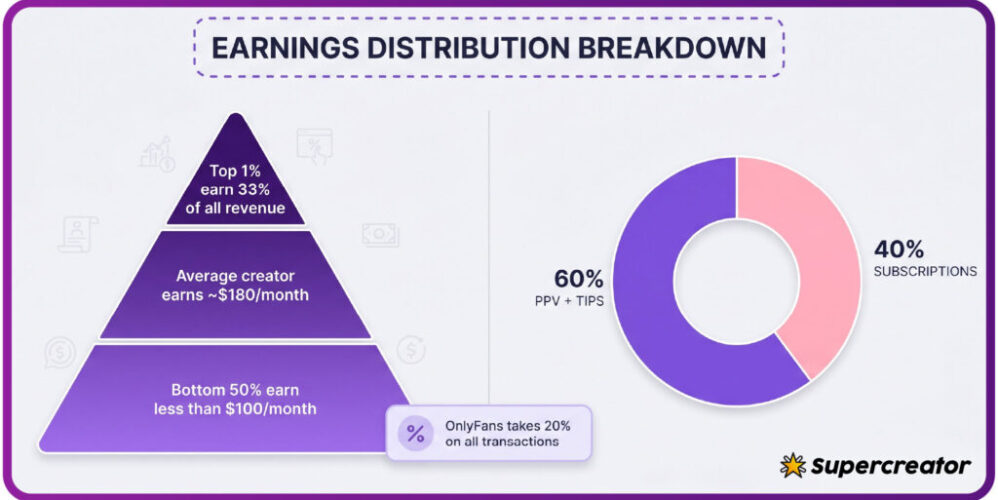
All legitimate payments run through the platform, which takes a 20% fee on subscriptions, tips, and pay-per-view messages, and the creator keeps 80%. Any request to move a payment outside that system removes buyer protection and the refund path. That is the core reason off-platform payment requests are treated as hostile until proven otherwise.
- The message asks for a gift card code, a crypto transfer, or a bank transfer instead of a card payment.
- The link opens a checkout page that does not match the platform domain.
- The sender offers a discount that is only valid if the payment happens immediately.
- The sender asks for a screenshot of a payment confirmation rather than a platform receipt.
- The conversation moves to another app and the payment request follows there.
- The sender claims the platform holds funds and needs a fee released first.
Tip: treat any payment request that leaves the platform as a hard stop. Read public page details through a ranking service such as BestOnlyFans, which compares public profile prices, promotions, activity and media counts, instead of trusting a price sent in a message.
Paid subscription prices range from a $4.99 minimum to a $49.99 maximum, with typical paid pages between $4.99 and $15 and averages around $5 to $10. There is no base price below $4.99, and only promotional first months may dip below that figure. A message quoting a lower permanent price is a mismatch with how pricing works.

Channel comparison
Trust level depends heavily on the channel. A message inside the platform account is not automatically safe, but it is easier to verify than a message on a social network. Email and social media messages require outside checks before any action.
| Channel | Trust level | Why |
| Platform inbox | Moderate | Account notices can be verified after login; unknown senders still appear |
| Low | Sender addresses are easy to imitate and links are easy to disguise | |
| Social media messages | Low | Accounts are easy to create and often copy a creator name or photo |
| External chat apps | Very low | No platform record exists and no refund path applies |
Free pages work differently: the price is set to $0 and earnings come from pay-per-view messages and tips. A phishing message aimed at free-page users usually offers locked media rather than a subscription discount. The verification step is the same in both cases. A practical starting point is best onlyfans downloader app, which lists pages by the signals above.

Account takeover attempts
Fake login pages are the most damaging script because a successful entry hands over the account itself. The page copies the real login screen closely, and the only reliable difference is the address bar. If credentials were entered on a page that was not opened manually, the account should be treated as compromised.
- Change the account password from a device that was not used to open the fake page.
- Turn on two-step authentication in the account settings.
- Review active sessions and sign out of any device that is not recognized.
- Check the subscription list and payment history for changes that were not made by the account holder.
- Contact support through the official site and describe what happened.
- Warn subscribers if the account posted or messaged anything during the exposure window.
A related pr
essure tactic involves price changes. When a creator raises the subscription price, auto-renew stops, and existing access lasts until the current paid period ends. Scammers use that rule to claim a renewal has failed and demand payment to keep access. The claim is false, and the account page shows the real status.

Reporting and cleanup
After a suspicious message, the priority order is secure, then report, then clean up. Reporting takes a minute and helps remove the account that sent the message. Cleanup covers the parts a report does not fix, such as saved payment details and reused passwords.
- Month 1: change the password, enable two-step authentication, and remove saved card details if the account was exposed.
- Month 1: report the sender and block the account, then keep the message as evidence.
- Month 2: review subscriptions and cancel anything unrecognized before the next renewal date.
- Month 2: check whether a promotional first month was applied and confirm what the renewal price will be.
- Ongoing: keep a single payment method for subscriptions so unusual charges stand out.
- Ongoing: expect the normal 20% platform fee on any legitimate subscription, tip, or pay-per-view purchase.
Readers who want to compare public page details before subscribing can review a second ranking service such as BestOnlyFans, which lists public profile prices, promotions, activity and media counts. A comparison of public details is more reliable than any claim sent in a message.
Guidance on staying safe on OnlyFans covers privacy settings as well as payment hygiene.
Extra detail
Small mistakes cause most losses, and they usually happen in a hurry. A short review of common errors keeps the response simple when a suspicious message arrives.
- Clicking a link before checking the sender address.
- Reusing the platform password on other sites.
- Paying with a gift card or crypto because the seller asked.
- Entering a code from a message into the account login screen.
- Ignoring an unexplained price change instead of checking the subscription page.
- Deleting the message before reporting it, which removes the evidence.
- Assuming a free page carries no risk, when pay-per-view and tips still involve payment details.
For a practical anchor on payment history, a reader can use an best onlyfans downloader app guide to review what has already been purchased and archived. That record helps confirm whether a claimed charge or locked purchase actually exists.
FAQ
How can I tell if a message is really from the platform?
Check the sender address and the link destination, then open the site manually and look for the same notice after login.
Why is a cheaper subscription offered in a message?
Paid prices start at $4.99, and only promotional first months may dip below that, so a lower permanent price is not consistent with platform pricing.
What happens if I enter my password on a fake page?
Change the password immediately, enable two-step authentication, review active sessions, and contact support through the official site.
Does a price increase cancel my access right away?
No. Auto-renew stops, and existing access lasts until the current paid period ends.